In this post we’ll introduce the OpenFaaS Python SDK and show how to use it to manage functions, namespaces, secrets, stream logs, and build container images with the Function Builder.
Introduction
We’re announcing the OpenFaaS Python SDK, a new client library that gives you full, typed access to the OpenFaaS REST API from Python. Whether you’re writing automation scripts, building CI/CD pipelines, or integrating OpenFaaS into a larger platform, the SDK covers the complete API surface: functions, namespaces, secrets, logs, invocations, and the Function Builder.
All request and response types use Pydantic v2 models, so you get IDE auto-complete, type checking, and clear error messages out of the box.
The SDK also has first-class support for OpenFaaS IAM, including token exchange, per-function scoped tokens, and a pluggable TokenSource protocol for any identity provider.
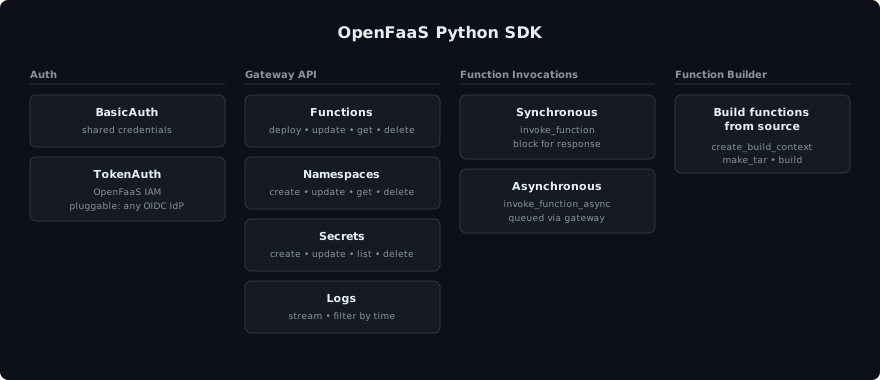
The Python SDK gives typed access to the full OpenFaaS REST API surface, with built-in support for IAM and the Function Builder.
Installation
pip install git+https://github.com/openfaas/python-sdk.git
The SDK requires Python 3.10+ and has two dependencies: requests for HTTP communication with the gateway, and pydantic v2 for validating and serialising all API request and response types.
Getting started
Create a client with basic auth and start interacting with the gateway:
from openfaas_sdk import Client, BasicAuth

with Client(
    gateway_url="https://gateway.example.com",
    auth=BasicAuth("admin", "password"),
) as client:
    # Get system info
    info = client.get_info()
    print(f"Gateway version: {info.version.release}")

    # List functions
    for fn in client.get_functions("openfaas-fn"):
        print(f"Function: {fn.name}  Replicas: {fn.replicas}")
The client is a context manager that closes the underlying requests.Session when done, but you can also call client.close() manually.
Authentication
Basic authentication
The examples above use BasicAuth. The password can also be read from a mounted secret file:
from openfaas_sdk import BasicAuth

with open("/var/secrets/basic-auth-password") as f:
    password = f.read().strip()

auth = BasicAuth(username="admin", password=password)
Zero trust with OpenFaaS IAM
OpenFaaS IAM brings zero trust to the OpenFaaS API by replacing long-lived shared passwords with short-lived tokens and fine-grained, least-privileged access. For example, a cron-connector only needs to list functions and read their annotations, not full CRUD on functions, secrets, and logs. IAM supports web identity federation with tokens from Kubernetes, GitHub Actions, GitLab CI, Keycloak, and any other OIDC provider.
When IAM is enabled, the SDK supports token-based authentication through TokenAuth with pluggable token sources. The SDK ships with two built-in token sources:
ServiceAccountTokenSource, reads a Kubernetes projected service account token from disk. Ideal for workloads running inside the same cluster as OpenFaaS. See: How to authenticate to the OpenFaaS API using Kubernetes JWT tokens.ClientCredentialsTokenSource, fetches tokens from an external identity provider using the OAuth 2.0client_credentialsgrant. Suited for services running outside the cluster.
You can also implement the TokenSource protocol yourself to integrate any identity provider. See the SDK README for an example.
Here is an example using ClientCredentialsTokenSource with TokenAuth. TokenAuth exchanges the id_token from your provider for an OpenFaaS gateway access token via the gateway’s /oauth/token endpoint:
from openfaas_sdk import Client, TokenAuth, ClientCredentialsTokenSource

ts = ClientCredentialsTokenSource(
    client_id="my-app",
    client_secret="secret",
    token_url="https://idp.example.com/oauth/token",
    scope="openid",
)
auth = TokenAuth(
    token_url="https://gateway.example.com/oauth/token",
    token_source=ts,
)

with Client("https://gateway.example.com", auth=auth) as client:
    functions = client.get_functions("openfaas-fn")
The OAuth 2.0 client_credentials grant is designed for server-to-server authentication where no user interaction is involved. Most identity providers support it, including Auth0, Okta, Keycloak, Microsoft Entra ID, and Google Cloud. You register an application (or service account) with the provider and receive a client ID and secret that can be exchanged for an OIDC token. ClientCredentialsTokenSource takes four parameters:
client_idandclient_secret, the credentials issued by your identity provider when you registered the application.token_url, the token endpoint of your identity provider (e.g.https://idp.example.com/oauth/token).scope, the OAuth scope to request.openidis required so the provider returns an OIDC id_token that OpenFaaS can verify.
The id_token from your identity provider and the OpenFaaS gateway access token are both cached internally and refreshed automatically before they expire.
See the IAM documentation for details on all supported authentication strategies.
Error handling
API errors are raised as typed exceptions, so you can handle them explicitly. To keep the examples in this post short, we omit error handling in the rest of the examples, but in practice you would wrap calls like this:
from openfaas_sdk.exceptions import NotFoundError, UnauthorizedError, ForbiddenError, APIConnectionError

try:
    fn = client.get_function("env", "openfaas-fn")
except NotFoundError:
    print("Function does not exist")
except UnauthorizedError:
    print("Invalid credentials")
except ForbiddenError:
    print("Insufficient permissions")
except APIConnectionError:
    print("Could not reach the gateway")
Functions
The SDK covers the full function lifecycle: deploy, update, and delete. To build function container images from source code, see the Function Builder section below.
from openfaas_sdk import Client, BasicAuth
from openfaas_sdk.models import FunctionDeployment

with Client("https://gateway.example.com", auth=BasicAuth("admin", "password")) as client:

    # Deploy the printer function from the function store,
    # it pretty-prints incoming HTTP requests to the function logs.
    spec = FunctionDeployment(
        service="printer",
        image="ghcr.io/openfaas/printer:latest",
        namespace="openfaas-fn",
    )
    client.deploy(spec)

    # Update the function with autoscaling labels
    spec.labels = {
        "com.openfaas.scale.type": "rps",
        "com.openfaas.scale.target": "50",
        "com.openfaas.scale.max": "10",
        "com.openfaas.scale.zero": "true",
        "com.openfaas.scale.zero-duration": "10m",
    }
    client.update(spec)

    # Get function details
    fn = client.get_function("printer", "openfaas-fn")
    print(f"Replicas: {fn.replicas}  Image: {fn.image}")
After deploying a function, you can poll get_function to wait until replicas are available:
import time

while True:
    fn = client.get_function("printer", "openfaas-fn")
    if fn.available_replicas >= 1:
        break
    time.sleep(1)

print("Function is ready")
To remove a function from the cluster:
client.delete_function("printer", "openfaas-fn")
Invoking functions
Once a function is deployed, you can call it through the SDK. The SDK provides two methods: invoke_function for synchronous calls and invoke_function_async for queued, asynchronous calls.
Synchronous invocation
Synchronous invocations are the simplest way to integrate with a function. The caller will block until a result is returned from the function. These are ideal for ingesting data from a webhook, user-facing operations, or when a web-page is served from a function. We’ll cover asynchronous invocations in the next section.
invoke_function calls the function directly and returns the raw requests.Response. You specify the HTTP method for each call:
# POST with a string or bytes payload
resp = client.invoke_function("printer", namespace="openfaas-fn", method="POST", payload="hello from the SDK")
print(resp.status_code, resp.text)

# GET request
resp = client.invoke_function("printer", namespace="openfaas-fn", method="GET")
You can also pass extra headers and query parameters:
resp = client.invoke_function(
    "printer",
    namespace="openfaas-fn",
    method="POST",
    payload="hello",
    headers={"Content-Type": "text/plain"},
    query_params={"verbose": "1"},
)
Unlike operations such as deploy or delete, function invocations do not raise exceptions on non-2xx status codes. The response is returned as-is, so you can handle application-level errors from your function directly:
resp = client.invoke_function("process-image", namespace="openfaas-fn", method="POST", payload=image_data)

if resp.ok:
    print("Processed:", resp.text)
elif resp.status_code == 429:
    print("Rate limited, retry later")
else:
    print(f"Unexpected status: {resp.status_code} - {resp.text}")
Asynchronous invocations
Asynchronous invocations are event-driven, get retried automatically and are best for long-running or fire and forget operations like converting files, ingesting data, and scheduled jobs.
invoke_function_async queues the invocation via the gateway’s async endpoint. The gateway returns 202 Accepted immediately and the function is executed in the background via the queue-worker. Async invocations always use POST internally.
# Fire-and-forget
client.invoke_function_async("process-order", payload=order_json)

# With a callback URL to receive the result
client.invoke_function_async(
    "process-order",
    payload=order_json,
    callback_url="https://api.example.com/hooks/order-complete",
)
Headers and query parameters can be passed the same way as with synchronous invocations.
Namespaces
Namespaces lets you organise functions into logical groups for tenants, teams, or projects. OpenFaaS namespaces map to Kubernetes namespaces, so policies like LimitRanges, network isolation, and dedicated nodepools can also be applied. The SDK supports the full CRUD lifecycle:
from openfaas_sdk.models import FunctionNamespace

# List all namespaces
namespaces = client.get_namespaces()
print(namespaces)  # ["openfaas-fn", "staging"]

# Create a namespace
client.create_namespace(FunctionNamespace(name="staging", labels={"team": "backend"}))

# Get namespace details
ns = client.get_namespace("staging")
print(ns.labels)

# Update a namespace
client.update_namespace(FunctionNamespace(name="staging", annotations={"owner": "alice"}))

# Delete a namespace
client.delete_namespace("staging")
Secrets
Secrets can be created, updated, listed, and deleted per namespace. The value is write-only, it is never returned by the API after creation:
from openfaas_sdk.models import Secret

# Create a secret
client.create_secret(Secret(name="db-password", namespace="openfaas-fn", value="s3cr3t"))

# List secrets in a namespace
for s in client.get_secrets("openfaas-fn"):
    print(s.name)

# Update a secret
client.update_secret(Secret(name="db-password", namespace="openfaas-fn", value="n3w-s3cr3t"))

# Delete a secret
client.delete_secret("db-password", namespace="openfaas-fn")
Logs
OpenFaaS provides streaming access to function logs via the gateway API. get_logs returns a lazy iterator that streams log lines from the gateway. You can tail a fixed number of lines, follow logs in real time, or filter by time:
# Get the last 100 lines
for msg in client.get_logs("printer", "openfaas-fn", tail=100):
    print(f"[{msg.timestamp}] {msg.instance}: {msg.text}")

# Follow (stream) logs as they arrive
for msg in client.get_logs("printer", "openfaas-fn", follow=True):
    print(msg.text)
Filter by time:
from datetime import datetime, timezone

since = datetime(2026, 4, 1, tzinfo=timezone.utc)
for msg in client.get_logs("printer", namespace="openfaas-fn", since=since):
    print(msg.text)
Function Builder
The Function Builder API can be used to publish new OCI images from source code. This component, when combined with the other APIs can be used to extend an existing platform with custom functionality and scripts from customers and staff.
The workflow has three steps:
- Assemble a build context from an OpenFaaS template and your function handler
- Pack the context into a tar archive along with the build configuration
- Send the tar to the Function Builder API, which builds and pushes the container image
For a detailed overview of the Function Builder API, including how templates work, registry authentication, and multi-arch builds, see: How to build functions from source code with the Function Builder API.
Assemble a build context
create_build_context prepares a Docker build context on disk from a template and a handler directory, then make_tar packages it into a tar archive that can be sent to the Function Builder API. Templates can be pulled with faas-cli template store pull <lang> or fetched from any other source.
from openfaas_sdk.builder import create_build_context, BuildConfig, make_tar, FunctionBuilder

# 1. Assemble the build context from template + handler
context_path = create_build_context(
    function_name="hello-world",
    handler="./hello-world",       # directory containing your function code
    language="python3-http",
    template_dir="./template",     # directory containing pulled templates
    build_dir="./build",
)

# 2. Pack the context into a tar archive with the build configuration
config = BuildConfig(
    image="ttl.sh/hello-world:1h",
    platforms=["linux/amd64"],
)
make_tar("/tmp/req.tar", context_path, config)
Build
Create a FunctionBuilder client with the URL of the builder and the HMAC secret. The hmac_secret must match the payload-secret configured in the builder deployment. You can obtain it with:
kubectl get secret -n openfaas payload-secret \
    -o jsonpath='{.data.payload-secret}' | base64 --decode
with open("/var/secrets/payload-secret") as f:
    hmac_secret = f.read().strip()

builder = FunctionBuilder(
    "https://builder.example.com",
    hmac_secret=hmac_secret,
)
build_stream() yields BuildResult objects as lines arrive, so you can display log output in real time:
for result in builder.build_stream("/tmp/req.tar"):
    for line in result.log:
        print(line)
    if result.status in ("success", "failed"):
        print(f"Final status: {result.status}")
        print(f"Image: {result.image}")
build() blocks until the builder returns a single complete result:
result = builder.build("/tmp/req.tar")
print(result.status)   # "success" / "failed"
print(result.image)    # fully-qualified image name
for line in result.log:
    print(line)
Wrapping up
The OpenFaaS Python SDK gives you typed, validated access to the OpenFaaS API from Python, including the Function Builder for building and pushing container images from source.
To get started:
- Install the SDK:
pip install git+https://github.com/openfaas/python-sdk.git - Read the SDK README for the full API reference
- Learn more about OpenFaaS IAM
- See the Function Builder documentation
The SDK is a good fit for automation scripts, CI/CD pipelines, and platform integrations. If you are building a multi-tenant platform where customers provide their own code, you can combine the Function Builder with the functions and namespaces APIs to go from source code to a running function in seconds. See also: Build a Function Editor for Your Customer Dashboard.
If you have questions, suggestions, or want to report a bug, feel free to open an issue on the openfaas/python-sdk repository. You can also reach out to us to discuss your use case.

Han Verstraete
Associate Software Developer, OpenFaaS Ltd